
Screenshots


Introduction
MySwimPro is an innovative swim workout application designed to help swimmers enhance their performance and reach their personal goals. Developed by MySwimPro, this app caters to individuals of all skill levels, offering personalized training plans that adapt to your swimming speed, goals, and expertise. With over 2.5 million users, MySwimPro has established itself as the leading swim workout app, providing a comprehensive suite of features that can help you swim faster, improve your technique, and enjoy your time in the water. Whether you're a competitive athlete looking to shave seconds off your time or a casual swimmer wanting to get back in shape, MySwimPro is tailored to meet your needs.
Graphics & Gameplay
The user interface of MySwimPro is sleek and intuitive, ensuring that swimmers can easily navigate through the app and access the features they need. The app's graphics are vibrant and engaging, with visually appealing icons and a clean layout that enhances user experience.
Key visuals include:
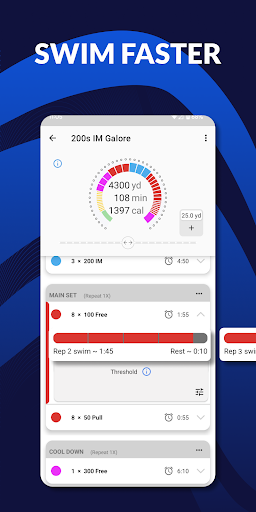
- Workout Interface: The app displays a detailed workout plan, showing customized intervals, target splits, and specific drills to follow, making it easy for users to track their progress during training sessions.
- Performance Analytics: After each swim, users can view detailed analytics, including duration, distance, strokes, splits, and SWOLF data, all presented in easy-to-read graphs and charts.
- Video Tutorials: The app includes stroke-specific video tutorials that help swimmers improve their technique, making the learning process more engaging and effective.
Overall, MySwimPro's graphics and layout create an enjoyable and efficient environment for swimmers to engage with their training plans.
Key Features
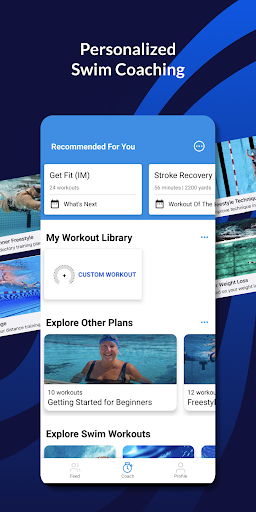
- Personalized Training Plans: MySwimPro provides customized swim training plans based on your skill level, goals, and performance. Users can start their journey with a 7-day free trial to explore the app.
- Daily Workouts: The app offers a new, personalized workout every day, ensuring that you never repeat the same workout twice, keeping your training fresh and challenging.
- Test Sets: Users can measure progress with test sets designed to track improvements and set new challenges.
- Extensive Workout Library: The app features a vast library of stroke-specific workouts, allowing swimmers to focus on improving their technique in all four strokes.
- Swim Tracker: MySwimPro captures both pool and open water swims, enabling users to log their workouts seamlessly.
- Analytics Dashboard: Detailed analytics provide insights into your performance, including duration, distance, strokes, and more, helping you identify areas for improvement.
- Wear OS and Garmin Integration: Sync your compatible devices to access guided workouts directly on your wrist, making it easier to keep track of your training.
- Support and Motivation: The app provides swim tips, drills, and motivational content to help keep users engaged and inspired throughout their training.
Mod Features
While MySwimPro is packed with features, some users may seek additional enhancements. Here are some creative mod features that could elevate the app experience:
- Premium Unlocked: Enjoy all premium features without any subscription fees, giving you access to exclusive workouts and advanced analytics.
- No Ads: Experience an uninterrupted training environment with no advertisements, allowing for a more focused workout session.
- Unlimited Money: Gain unlimited access to premium features and exclusive content, enabling you to fully utilize the app without any restrictions.
- Customizable Themes: Choose from a variety of themes to personalize your app interface, enhancing your overall experience while using the app.
How to Install APK on Android
Installing the MySwimPro APK on your Android device is a straightforward process. Follow these steps to get started:
- Enable Unknown Sources: Go to your device's Settings, then navigate to Security. Enable the option for "Install from Unknown Sources" to allow the installation of APK files.
- Download the APK: Click on the download link provided below to obtain the MySwimPro APK file.
- Locate the File: Once the download is complete, use a file manager to navigate to your Downloads folder or the location where the APK was saved.
- Install the APK: Tap on the APK file to begin the installation. Follow the on-screen instructions to complete the setup process.
- Open MySwimPro: Once installed, locate the MySwimPro app icon on your home screen or app drawer and tap to launch it.
- Sign Up or Log In: Create an account or log in to start using the app and begin your personalized swim training plan.
Conclusion
MySwimPro is a valuable tool for swimmers looking to enhance their performance and achieve their goals. With its personalized training plans, extensive workout library, and detailed analytics, this app has everything you need to make the most of your swimming routine. The engaging graphics and user-friendly interface make it easy to use, ensuring that you stay motivated and on track with your training. Don’t miss out on the opportunity to elevate your swimming experience!
Call To Action
Ready to dive into a personalized swim training experience? Download MySwimPro: Swim Workout App now and start your free trial today!